

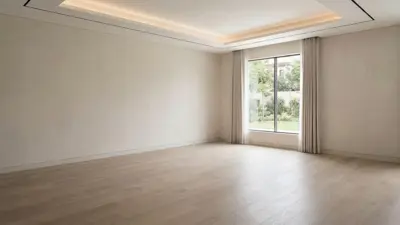
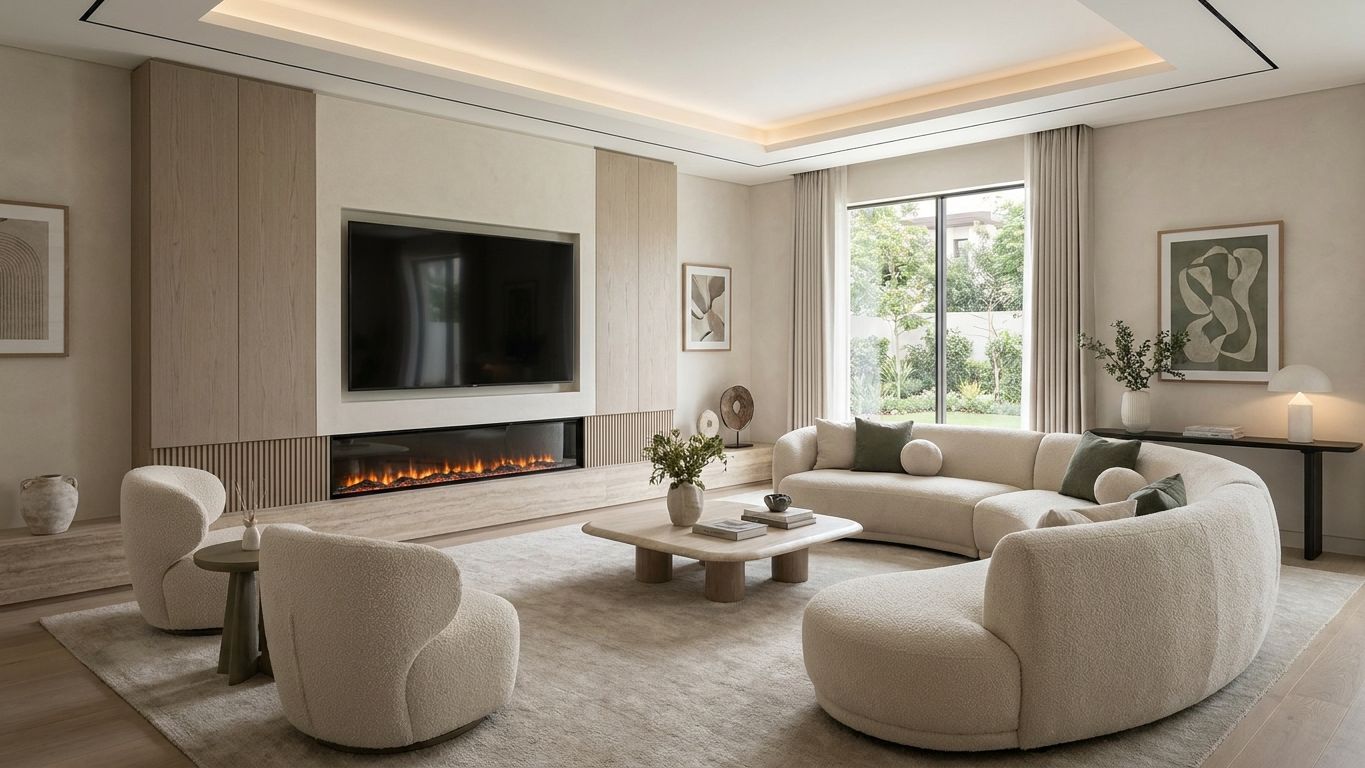
"Create a 7-second cinematic architectural timelapse using the two provided reference images. The first image represents the exact initial state of the room, completely empty. The second image represents the exact final state, fully furnished and decorated. Start with the empty room from the first image. Keep the camera completely locked in the exact same position, height, focal length, perspective, framing and composition throughout the entire animation. Do not move, zoom, rotate or change the camera. Animate the interior progressively assembling itself in a realistic and elegant architectural construction timelapse. The existing architectural shell remains fixed while the interior elements gradually appear and are assembled into their final positions. First, the large neutral area rug rolls out over the existing light wood flooring. Then, the built-in media unit with its light wood paneling and long stone hearth progressively materialize and construct themselves along the left wall. Next, the large flat-screen TV and linear fireplace are installed into the wall, and the fire ignites. After that, the curved beige sofa, the two matching armchairs, and the thick stone coffee table assemble from their structural components in the center of the room. The dark console table slides into position against the right wall. Artwork progressively appears on the walls. Vases with greenery, books, and smaller decorative objects naturally populate the coffee table, console, and hearth. Finally, the table lamp on the right turns on, adding to the warm ambient glow of the room. The transformation should feel like a sophisticated architectural timelapse, as if the entire interior design is being built and installed at accelerated speed. Objects should appear through believable construction and assembly movements, rather than simply popping into existence. Furniture components can slide, rise, rotate and lock precisely into their final positions. Cabinetry and architectural elements should progressively build from their structural components. Decorative objects should be placed rapidly but naturally. Preserve the exact geometry, proportions, architectural elements, window positions, ceiling shape and perspective from the reference images. The final frame must match the second reference image as closely as possible. Do not introduce furniture, objects, materials or architectural elements that are not present in the final reference.

Related videos
What does Gulf Picasso offer?

AI Image Generator
Gulf Picasso provides the best free AI image generator, enabling you to create images from text, the best AI art, logo drafts, and various other AI-generated photos, even an AI tattoo generator. Use it to get design ideas for luxury bedroom interior design, the best beauty salon interior design, bathroom designs, and kitchen design. This tool effortlessly brings any design concept to life.
Get your image nowAI Video Generator
Create stunning videos using just a text prompt or a reference image with our AI Video Generator. Powered by the latest cutting-edge video models, this tool transforms your ideas into dynamic visuals. Whether you're looking to bring stories to life or generate short video clips for content creation, our technology delivers high-quality results in minutes.
Get your video now
AI Image Editor
Edit your image easily using AI: You can now edit specific parts of the image, replace or remove elements, remove the background, expand the image, or improve its quality. All this with a text description or using tools. Enjoy complete creative freedom and professional results in seconds.
Edit your image now
AI Logo Generator
Our AI Logo Generator is a cutting-edge tool meticulously designed to make the process of creating stunning logos both easy and efficient. With just a few simple steps, you can craft a logo that perfectly represents your brand. All you need to do is enter your company name and specify the logo elements you envision, including your preferred styles, colors, and any other details that reflect your brand identity. The tool then swiftly generates a unique, professional-quality logo in seconds.
Generate your logo nowAI Lipsync Generator
Bring your videos to life with our AI LipSync Generator. Simply pick a video, choose your favorite voice actor, and write your script. In just minutes, your video will have perfectly synced, natural-sounding audio that makes it fun, engaging, and ready to share anywhere. Whether you’re telling a story, making a meme, or creating content for your followers, this tool makes the process effortless and exciting.
Generate your lipsync now
Video Project Editor
Your all-in-one video editing studio, right in the browser. Combine clips, trim and rearrange scenes, layer text overlays and captions, drop in images, and mix in background music — all on a professional multi-track timeline. Choose from ready-made templates to jumpstart your project, pick any aspect ratio for Reels, Shorts, or widescreen, and export in high quality when you're done. No downloads, no watermarks — just drag, drop, and create.
Start editing now
AI Model Trainer
Train an AI model on things it hasn’t learned before. For example: Use your own photos to create images of yourself in new places, or use photos of famous spots in your city to make scenes with those locations. There’s no limit to what you can create!
Train your model now
AI Social Media Post Generator
AI Social Media Post Generator is a powerful tool that enables you to effortlessly create engaging social media posts, complete with images, by simply providing a topic. This advanced AI-driven tool acts as an Instagram post generator, AI caption generator, and AI content generator all in one. It also supports other major social media platforms, including YouTube, X (formerly Twitter), Facebook, and LinkedIn.
Generate your post now