

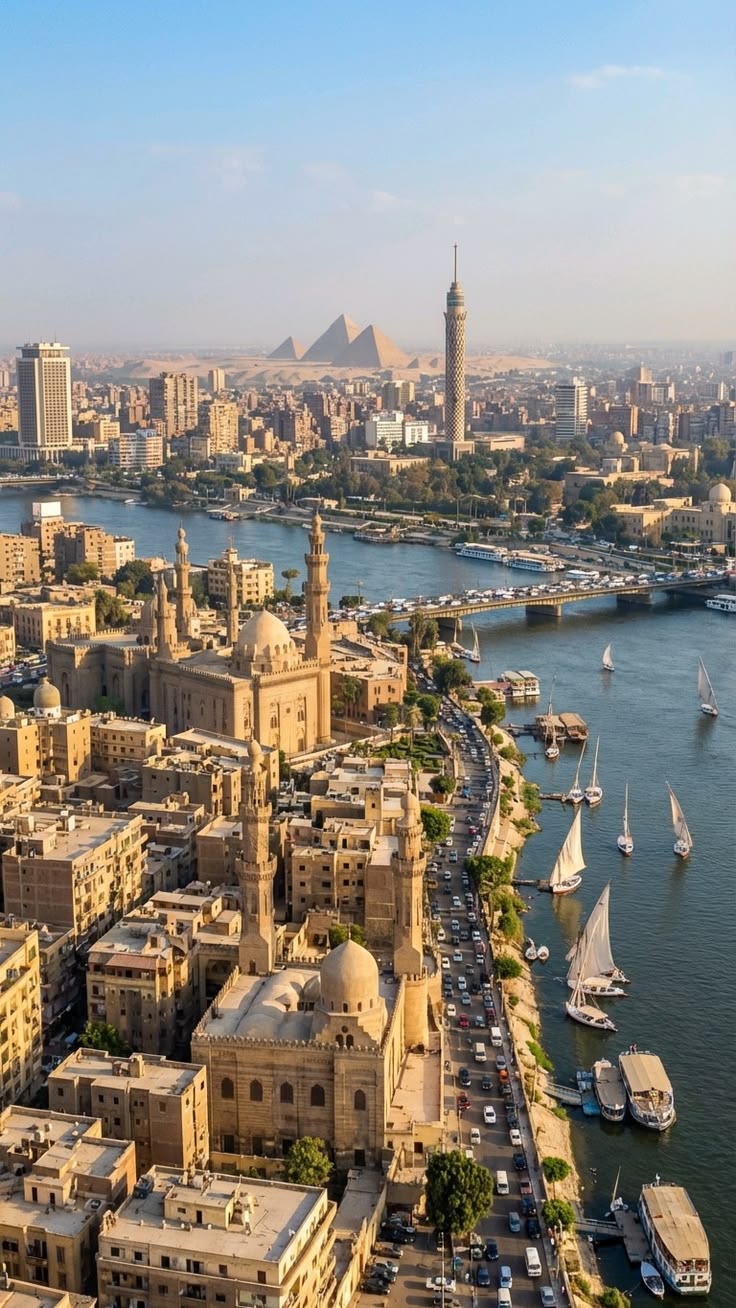
1- تحليل المشهد المشهد عبارة عن طبقات بصرية عميقة جداً تمتد من المقدمة إلى الأفق: المقدمة: المساجد التاريخية والمباني القديمة على ضفة النيل. الطبقة المتوسطة: كورنيش النيل، السيارات، المراكب الشراعية، الجسر. الطبقة البعيدة: برج القاهرة والمباني الحديثة. الخلفية النهائية: أهرامات الجيزة في الأفق. أقوى عنصر سينمائي هنا هو وجود 4 مستويات عمق متتابعة داخل كادر واحد، مما يسمح ببارالاكس قوي جداً أثناء الحركة الأمامية المنحنية. النقطة A فوق المسجد الكبير الموجود أسفل الصورة مباشرة، بالقرب من المئذنتين في المقدمة. النقطة B باتجاه الأهرامات في الأفق مع انتهاء الحركة قرب محور برج القاهرة والأهرامات معاً. هذا المسار يحقق: أقصى إحساس بالحجم. انتقال بصري من التاريخ إلى الحداثة ثم إلى الأهرامات. بارالاكس قوي بين المآذن والكورنيش والنيل والبرج والأهرامات. سرد بصري متصاعد ينتهي بأقوى عنصر بصري في المشهد. --- 2- وصف المسار يبدأ الدرون منخفضاً نسبياً فوق المآذن الأمامية. ثم يتحرك للأمام بمحاذاة انحناءة النيل. ينفذ قوساً سينمائياً خفيفاً نحو اليمين أثناء التقدم. يرتفع تدريجياً مع استمرار الحركة. تتحرك المساجد خارج الكادر تدريجياً بينما يزداد حضور النيل والجسر. بعد تجاوز منتصف المشهد يتجه المسار تدريجياً نحو محور برج القاهرة. في الثواني الأخيرة يستمر التقدم والارتفاع البطيء حتى تصبح الأهرامات وبرج القاهرة هما نقطة التركيز الرئيسية. الحركة كلها عبارة عن لقطة Drone Push-In + Ascending Arc واحدة متصلة بدون أي توقف أو تغيير اتجاه مفاجئ. --- 3- تقسيم الحركة زمنياً 0-5 ثوان بداية فوق المسجد الأمامي. حركة أمامية بطيئة. ارتفاع طفيف جداً. ظهور بارالاكس واضح بين المآذن والمباني القريبة. النيل يبدأ بالتمدد داخل الكادر. 5-10 ثوان زيادة طفيفة في سرعة التقدم. انحناءة ناعمة باتجاه اليمين. المرور البصري فوق الكورنيش والجسر. المراكب الشراعية تتحرك نسبياً أسفل الكادر. برج القاهرة يصبح أكثر بروزاً. 10-15 ثانية استمرار الصعود التدريجي. التقدم نحو الأفق. برج القاهرة والأهرامات يسيطران على مركز التكوين. اتساع المدينة بالكامل أسفل الكاميرا. نهاية مستقرة ناعمة بدون توقف حاد. --- 4- برومبت Seedance 2.0 النهائي باللغة الإنجليزية فقط Single continuous cinematic FPV drone shot. Start above the historic mosque complex in the foreground near the twin minarets at the bottom of the frame. The drone performs a smooth forward push following the natural curve of the Nile River while gradually ascending. Maintain realistic drone physics with subtle inertia, gentle banking, and smooth acceleration. During the first section, create strong foreground parallax as the minarets and nearby buildings slide past the camera. Continue advancing along the riverside, keeping all landmarks locked in their original positions and preserving the exact geography of the scene. From the middle of the shot, execute a soft rightward cinematic arc while continuing forward and slowly gaining altitude. The river, bridge, traffic, and sailboats reveal increasing depth and scale. The Cairo Tower becomes progressively more prominent in the composition. In the final section, continue the smooth ascent and forward movement toward the skyline. The city expands beneath the camera while the Cairo Tower and the Pyramids gradually become the dominant focal points. End with a majestic elevated view centered between the tower and the pyramids, emphasizing scale, depth, and atmosphere. Ultra-realistic drone cinematography, natural motion blur, cinematic depth, strong parallax, realistic aerial perspective, golden daylight, smooth trajectory, seamless movement, continuous single take, no cuts, no transitions, no camera jumps, no sudden direction changes, no scene reconstruction, no object relocation, no landmark movement, preserve original architecture and layout, maintain exact spatial consistency throughout the shot. If any red lines, arrows, path guides, annotations, markings, overlays, text, or trajectory indicators exist in the source image, treat them only as camera path references and completely remove them from every frame of the final video.

Related videos
What does Gulf Picasso offer?

AI Image Generator
Gulf Picasso provides the best free AI image generator, enabling you to create images from text, the best AI art, logo drafts, and various other AI-generated photos, even an AI tattoo generator. Use it to get design ideas for luxury bedroom interior design, the best beauty salon interior design, bathroom designs, and kitchen design. This tool effortlessly brings any design concept to life.
Get your image nowAI Video Generator
Create stunning videos using just a text prompt or a reference image with our AI Video Generator. Powered by the latest cutting-edge video models, this tool transforms your ideas into dynamic visuals. Whether you're looking to bring stories to life or generate short video clips for content creation, our technology delivers high-quality results in minutes.
Get your video now
AI Image Editor
Edit your image easily using AI: You can now edit specific parts of the image, replace or remove elements, remove the background, expand the image, or improve its quality. All this with a text description or using tools. Enjoy complete creative freedom and professional results in seconds.
Edit your image now
AI Logo Generator
Our AI Logo Generator is a cutting-edge tool meticulously designed to make the process of creating stunning logos both easy and efficient. With just a few simple steps, you can craft a logo that perfectly represents your brand. All you need to do is enter your company name and specify the logo elements you envision, including your preferred styles, colors, and any other details that reflect your brand identity. The tool then swiftly generates a unique, professional-quality logo in seconds.
Generate your logo nowAI Lipsync Generator
Bring your videos to life with our AI LipSync Generator. Simply pick a video, choose your favorite voice actor, and write your script. In just minutes, your video will have perfectly synced, natural-sounding audio that makes it fun, engaging, and ready to share anywhere. Whether you’re telling a story, making a meme, or creating content for your followers, this tool makes the process effortless and exciting.
Generate your lipsync now
Video Project Editor
Your all-in-one video editing studio, right in the browser. Combine clips, trim and rearrange scenes, layer text overlays and captions, drop in images, and mix in background music — all on a professional multi-track timeline. Choose from ready-made templates to jumpstart your project, pick any aspect ratio for Reels, Shorts, or widescreen, and export in high quality when you're done. No downloads, no watermarks — just drag, drop, and create.
Start editing now
AI Model Trainer
Train an AI model on things it hasn’t learned before. For example: Use your own photos to create images of yourself in new places, or use photos of famous spots in your city to make scenes with those locations. There’s no limit to what you can create!
Train your model now
AI Social Media Post Generator
AI Social Media Post Generator is a powerful tool that enables you to effortlessly create engaging social media posts, complete with images, by simply providing a topic. This advanced AI-driven tool acts as an Instagram post generator, AI caption generator, and AI content generator all in one. It also supports other major social media platforms, including YouTube, X (formerly Twitter), Facebook, and LinkedIn.
Generate your post now